
AQL Sampling Calculator
Sample Size: 0 units
Critical
Accept: 0
Reject: 0
Major
Accept: 0
Reject: 0
Minor
Accept: 0
Reject: 0
How to Use the Calculator
- I. Select the total shipment quantity (lot size).
- II. Choose an inspection level, typically General Level II.
- III. Set the AQL values for critical, major, and minor defects. Common defaults are 0 / 2.5 / 4.0.
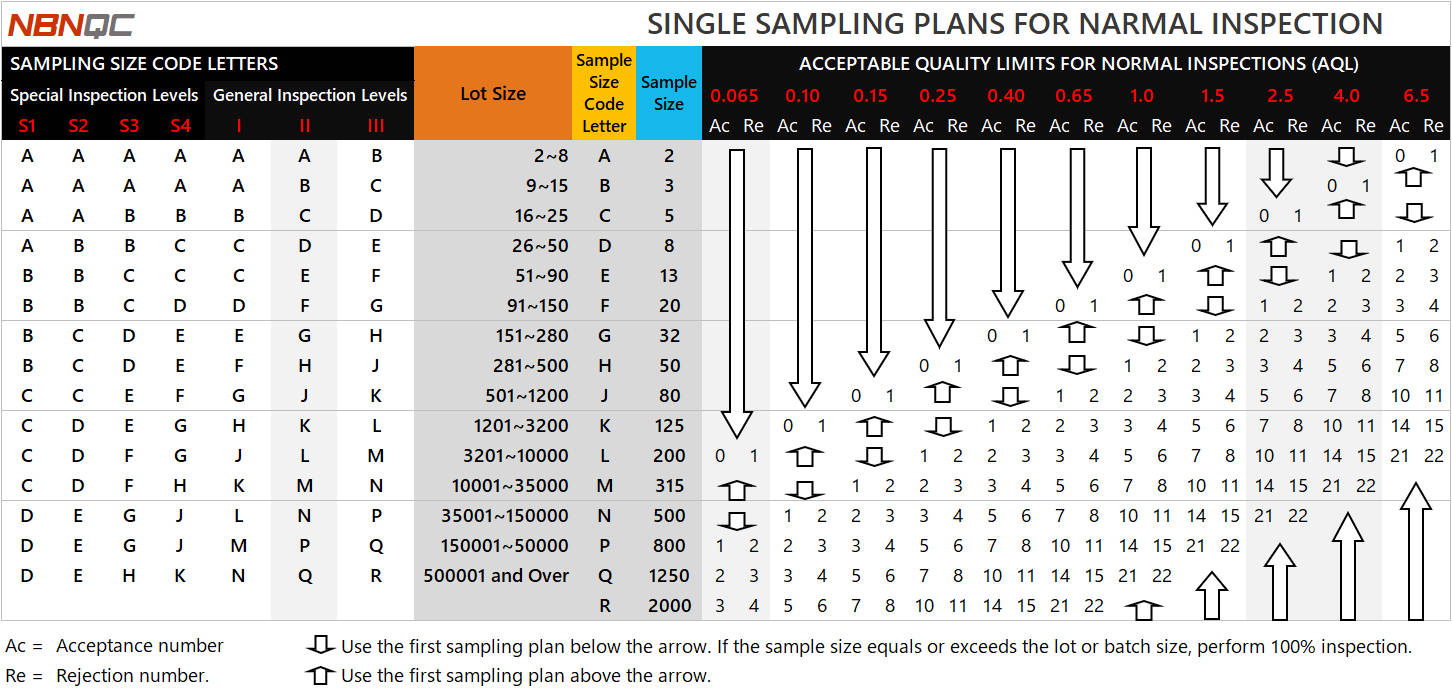
How to Read the AQL Sampling Tables
The AQL sampling tables determine sample sizes and acceptance/rejection numbers based on the lot size, inspection level, and selected AQL values.
-
Find the lot size and inspection level to identify the sample size code letter on the left side of the table.
-
Use the code letter to find the corresponding sample size in the middle of the table.
-
Locate the selected AQL value to find the acceptance number (Ac) and rejection number (Re) on the right of the table.
Ac (Acceptance Number): The maximum number of defective units allowed in the sample for acceptance.
Re (Rejection Number): The minimum number of defective units that results in rejection under the selected sampling plan.