
AQL Sampling Calculator
Calculate sample size and acceptance limits based on the ANSI/ASQ Z1.4 AQL standard.
Sample Size: 0 units
Critical
Accept: 0
Reject: 0
Major
Accept: 0
Reject: 0
Minor
Accept: 0
Reject: 0
How to Use the AQL Sampling Calculator
- Select the total shipment quantity, also called the lot size.
- Choose the inspection level, commonly General Level II.
- Select the AQL limits for critical, major, and minor defects. Common default settings are Critical: Not Allowed, Major: 2.5, and Minor: 4.0.
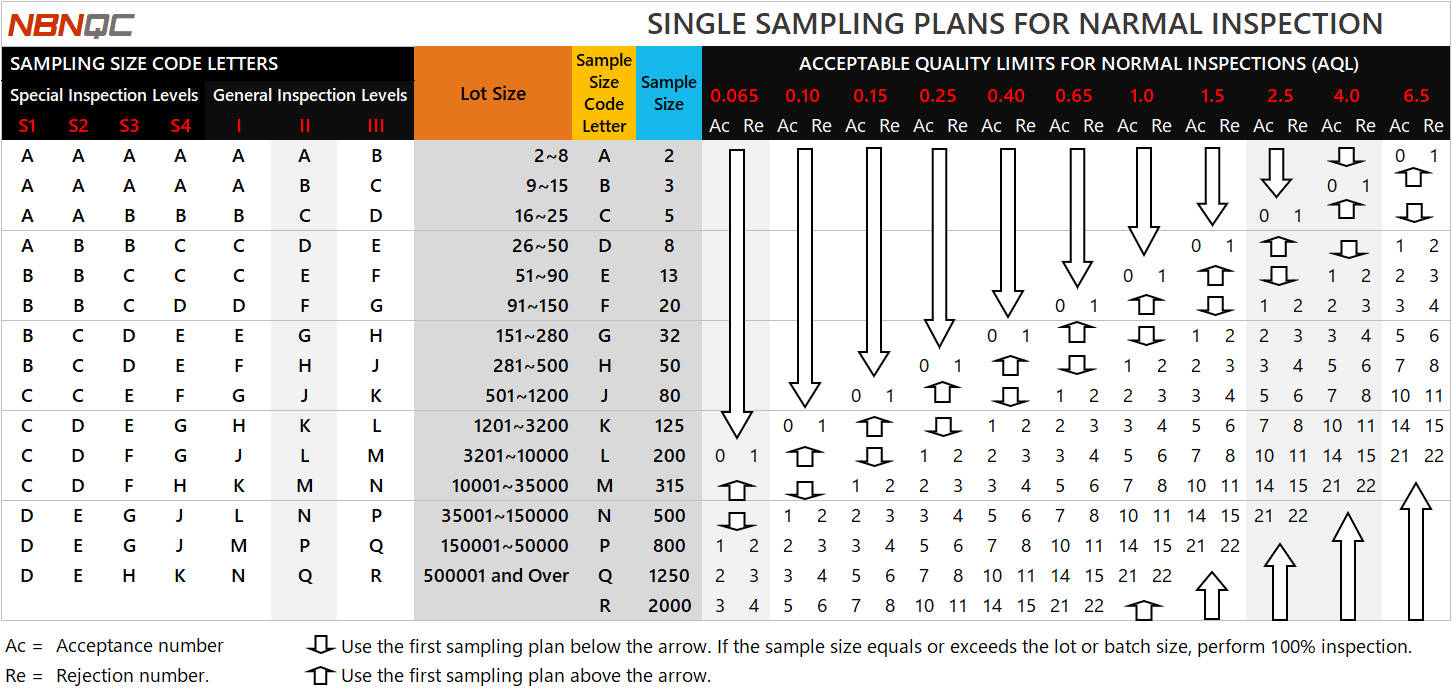
How to Read the AQL Sampling Tables
The AQL sampling tables show how the sample size and acceptance limits are determined based on the lot size, inspection level, and selected AQL values.
First, locate the lot size and inspection level to find the sample size code letter in Table A (-Left).
Then, use the code letter to find the required sample size in Table B (-Right).
Finally, check the selected AQL columns to find the acceptance number (Ac) and rejection number (Re).
If the number of defects is equal to or higher than the rejection number, the lot is usually considered not acceptable under the selected AQL sampling plan.
Understanding AQL Sampling in Quality Inspections
AQL, or Acceptable Quality Limit, is a sampling method used in product quality inspections to assess the overall quality level of a production lot against the agreed quality requirements.
Instead of checking every unit, inspectors use the lot size and inspection level to determine the sample size, then randomly select samples from the production lot. Any defects found are classified as critical, major, or minor and compared with the selected AQL limits.
This helps buyers make a practical decision on whether the shipment can be accepted, rejected, or needs further review or rework.